Online Page Layout Editor
A page layout editor for print-style and on-screen documents: multi-page spreads, parent pages, frames with threaded stories, paragraph and character styles, colour swatches and text wrap. The layout runs inside a browser tab, and Save and Export hand the file to your browser’s download manager, so it is stored wherever you keep your downloads.
Runs in your browser. No FreeAIGeneration account required.
Nothing heavy loads until you press launch.
Preview
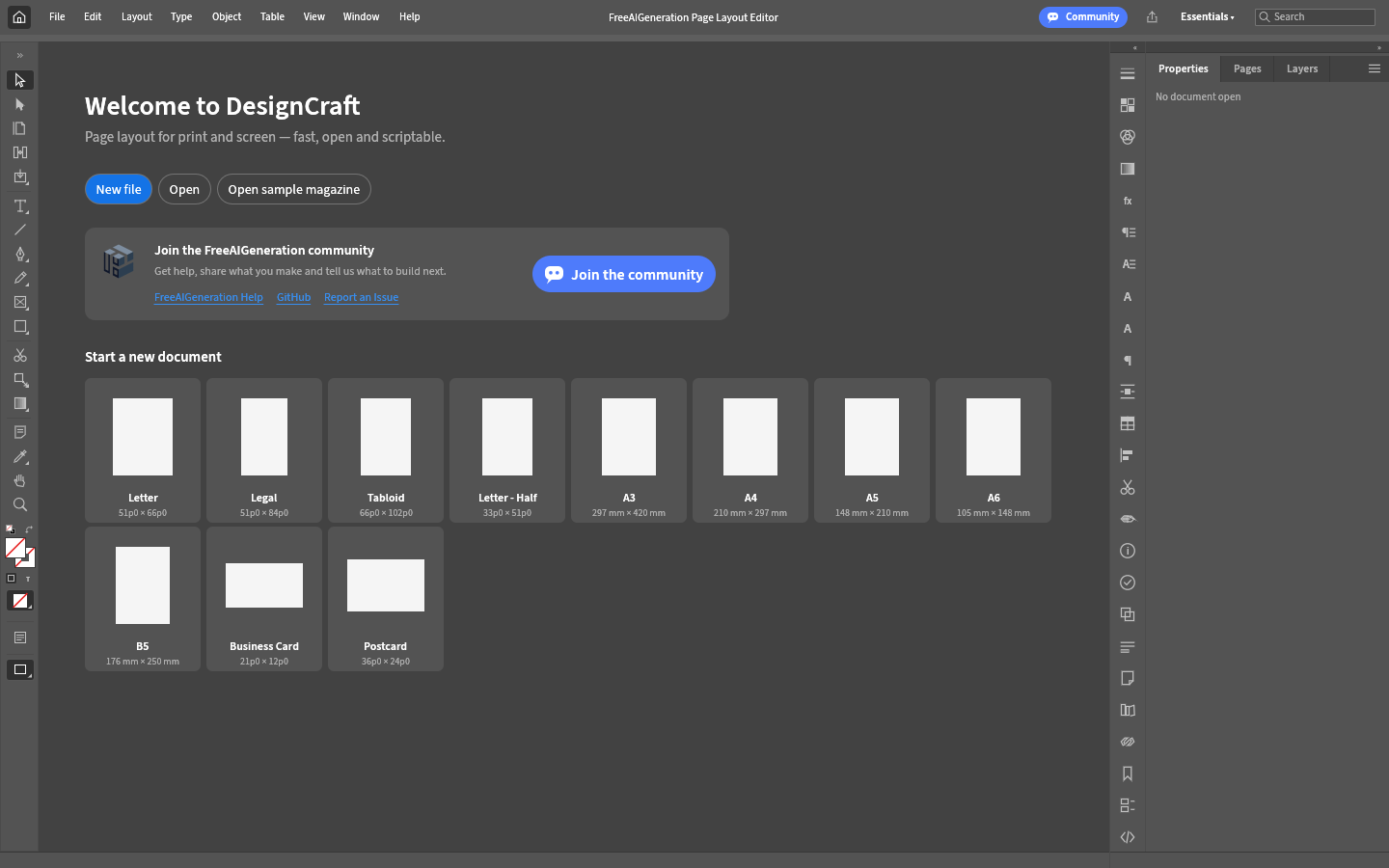
Editor workspace
The editor opens here, across the whole content width. Nothing is downloaded until you launch it.
Ready to launch
Loading the editor…
Editor running
The editor could not start
The editor bundle did not load. Check your connection, then try again.
The editor bundle for this version is not available on this server yet, so the app could not start.
The request never reached the server. You may be offline, or a network filter, firewall or browser extension blocked it.
The server answered with something other than the editor page, so the editor could not start.
The editor did not finish loading in time.
What you can try
- Check your connection and reload this page.
- Press “Try again” to request the editor a second time.
- Use a current version of Chrome, Edge, Firefox or Safari.
- Try a different launch option above, for example a fallback renderer.
This browser exposes neither WebGPU nor WebGL2, so the editor may not render. The compatibility option above selects the supported fallback where the engine offers one.
Fullscreen is not available in this browser, so the editor stays on this page.
Advanced options
Only options documented by the upstream application are listed.
Troubleshooting
- Check your connection and reload this page.
- Press “Try again” to request the editor a second time.
- Use a current version of Chrome, Edge, Firefox or Safari.
- Try a different launch option above, for example a fallback renderer.
Built for desktop browsers: current Chrome, Edge, Firefox and Safari.
- No account and no cloud documents: the editor has no storage service of its own. Closing the tab without saving loses unsaved work.
- Save writes the app’s own `.designcraft` file and exporting a page produces a PNG. PDF/X-4, PDF/A-2b, EPUB and IDML export are documented by the upstream project but were not verified in this build, so do not treat the output as print-production ready.
- Text layout goes through the engine’s own paragraph composer. The sample magazine’s threaded text and its reflow when the window is resized were verified; hand-drawn frames and freshly typed text were not part of that verification.
- The upstream project is pre-alpha and publishes a list of known gaps. Expect rough edges, and keep another copy of important work.
- The editor’s own interface is in English, including menus, panels and dialogs. This FreeAIGeneration page around it is localized.
- A machine without a usable GPU renders more slowly. Switch the graphics mode in the launch options if the canvas stays black or stutters, and click inside the editor once before using keyboard shortcuts.
- Page Layout Editor is powered by the independent open-source project DesignCraft, by the ArtCraft team, used under its licence. FreeAIGeneration is not affiliated with, sponsored by or endorsed by that team, and Adobe and InDesign are trademarks of Adobe Inc. used only to describe a compatible workflow.
Compatibility
Built for desktop browsers: current Chrome, Edge, Firefox and Safari. The editor composites through WebGPU when the browser offers it and falls back to WebGL2 automatically; the CPU option forces the CPU canvas path on machines without a usable GPU. It is not built for phones or tablets. The first launch downloads a large editor — about 43 MB of WebAssembly — so it takes noticeably longer than a normal page.
This tool needs a current version of Chrome, Edge, Firefox or Safari with JavaScript enabled.
- No account and no cloud documents: the editor has no storage service of its own. Closing the tab without saving loses unsaved work.
- Save writes the app’s own `.designcraft` file and exporting a page produces a PNG. PDF/X-4, PDF/A-2b, EPUB and IDML export are documented by the upstream project but were not verified in this build, so do not treat the output as print-production ready.
- Text layout goes through the engine’s own paragraph composer. The sample magazine’s threaded text and its reflow when the window is resized were verified; hand-drawn frames and freshly typed text were not part of that verification.
- The upstream project is pre-alpha and publishes a list of known gaps. Expect rough edges, and keep another copy of important work.
- The editor’s own interface is in English, including menus, panels and dialogs. This FreeAIGeneration page around it is localized.
- A machine without a usable GPU renders more slowly. Switch the graphics mode in the launch options if the canvas stays black or stutters, and click inside the editor once before using keyboard shortcuts.
- Page Layout Editor is powered by the independent open-source project DesignCraft, by the ArtCraft team, used under its licence. FreeAIGeneration is not affiliated with, sponsored by or endorsed by that team, and Adobe and InDesign are trademarks of Adobe Inc. used only to describe a compatible workflow.
Open the editor
A page layout editor for print-style and on-screen documents: multi-page spreads, parent pages, frames with threaded stories, paragraph and character styles, colour swatches and text wrap. The layout runs inside a browser tab, and Save and Export hand the file to your browser’s download manager, so it is stored wherever you keep your downloads.
Open-source attribution
This page embeds an upstream open-source application distributed under the MIT or Apache-2.0 licence. Licence files and notices ship with the bundle.
- Upstream engine: designcraft v0.6.0
- Licence: MIT OR Apache-2.0 (LICENSE-MIT, LICENSE-APACHE, NOTICE, OFL-SourceSans3.txt, OFL-SourceSerif4.txt, OFL-Inter.txt, OFL-JetBrainsMono.txt, FONT-LICENCE-Hack-MIT-and-Bitstream-Vera.txt, FONT-LICENCE-Ubuntu-Font-Licence-1.0.txt)
- NOTICE / ATTRIBUTION.md
- Source code: storytold/designcraft
- Version: 0.6.0-faig.4 sha256 b43ebefc5b7900c8…
Independent project. Not affiliated with, endorsed by or sponsored by any software vendor.
Related tools
Privacy
The editor runs in your browser. FreeAIGeneration has no account system and stores no documents; see the privacy page for browser storage and third-party details.