Online RAW Photo Editor
LightCraft is a complete RAW library and developer that runs in your browser. Import raw or JPEG files, adjust exposure, tone curves, the colour mixer, masks and crop, then export an image when you are done. Nothing to install and no FreeAIGeneration account required. It is an editor, not an AI generator: your editing decisions are yours, and the photos stay exactly as you see them.
Runs in your browser. No FreeAIGeneration account required.
Nothing heavy loads until you press launch.
Preview
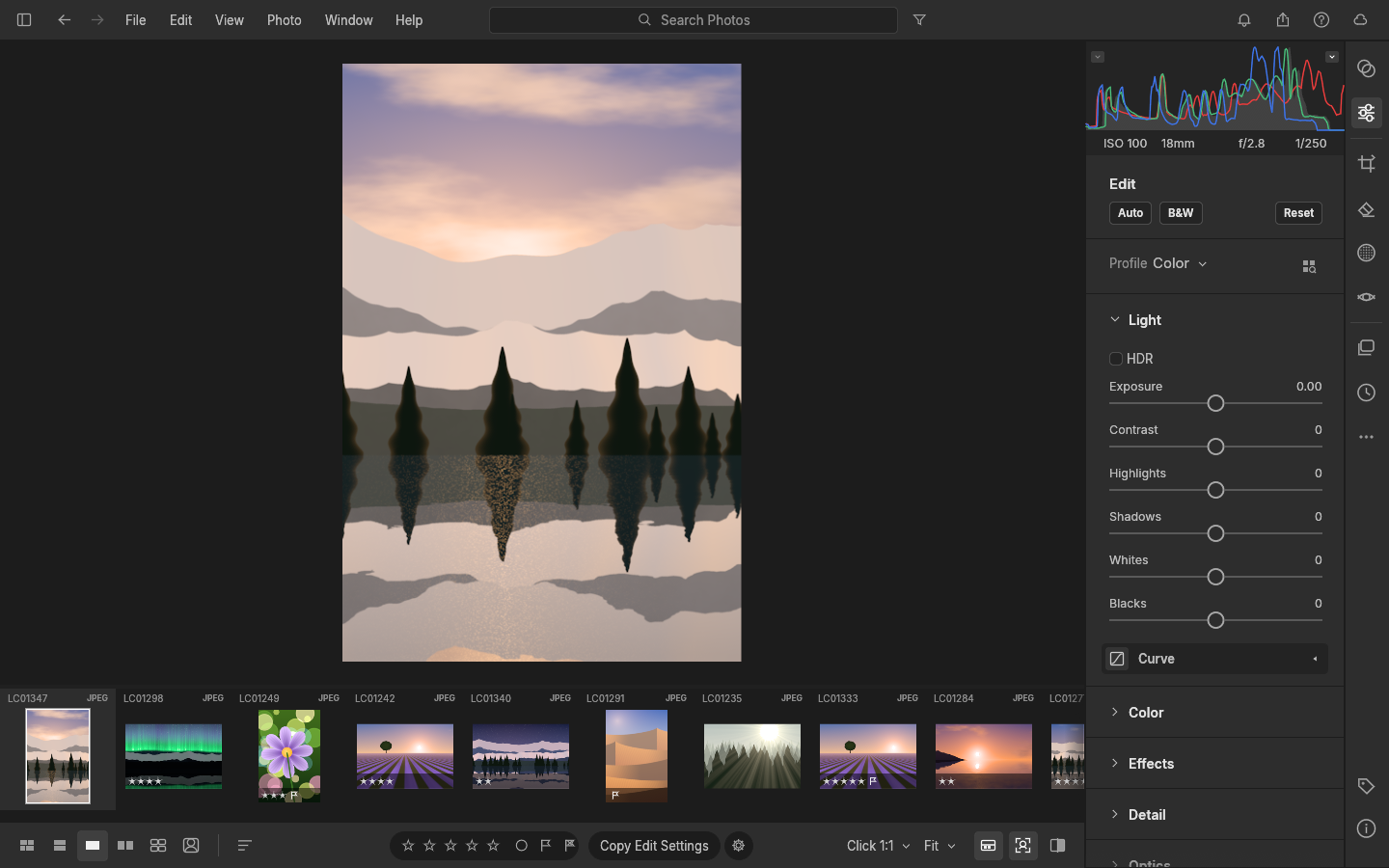
Editor workspace
The editor opens here, across the whole content width. Nothing is downloaded until you launch it.
Ready to launch
Loading the editor…
Editor running
The editor could not start
The editor bundle did not load. Check your connection, then try again.
The editor bundle for this version is not available on this server yet, so the app could not start.
The request never reached the server. You may be offline, or a network filter, firewall or browser extension blocked it.
The server answered with something other than the editor page, so the editor could not start.
The editor did not finish loading in time.
What you can try
- Check your connection and reload this page.
- Press “Try again” to request the editor a second time.
- Use a current version of Chrome, Edge, Firefox or Safari.
Fullscreen is not available in this browser, so the editor stays on this page.
Advanced options
Only options documented by the upstream application are listed.
Troubleshooting
- Check your connection and reload this page.
- Press “Try again” to request the editor a second time.
- Use a current version of Chrome, Edge, Firefox or Safari.
Works in current versions of Chrome, Edge, Firefox and Safari.
- This is an experimental browser build. Its library lives in this browser profile, for this exact address — clearing site data, using a private window or moving the app to another address starts again from an empty library.
- Keep your original photos somewhere else and back the library up periodically with File ▸ Back Up Library…, which downloads a zip of the library and of every photo you imported. File ▸ Restore Library from Backup… puts it back after checking each file, and backups larger than 4 GB are not supported yet.
- One tab at a time: a second tab is refused rather than allowed to overwrite the library behind your back.
- The app asks the browser to keep your data, and that request can be declined; then the browser may clear the library when its storage runs low. That is the main reason to keep a backup.
- Deleting a photo from the library does not delete the copy stored in browser storage, so the space is only reclaimed by clearing this site’s data.
Compatibility
Works in current versions of Chrome, Edge, Firefox and Safari. The interface needs WebGL2; without it the app shows a notice instead of the editor, and there is no 2D fallback for the interface. Rendering runs on your CPU in background workers, so a large raw file takes a moment to open and a large library uses real memory. WebGPU is not required.
This tool needs a current version of Chrome, Edge, Firefox or Safari with JavaScript enabled.
- This is an experimental browser build. Its library lives in this browser profile, for this exact address — clearing site data, using a private window or moving the app to another address starts again from an empty library.
- Keep your original photos somewhere else and back the library up periodically with File ▸ Back Up Library…, which downloads a zip of the library and of every photo you imported. File ▸ Restore Library from Backup… puts it back after checking each file, and backups larger than 4 GB are not supported yet.
- One tab at a time: a second tab is refused rather than allowed to overwrite the library behind your back.
- The app asks the browser to keep your data, and that request can be declined; then the browser may clear the library when its storage runs low. That is the main reason to keep a backup.
- Deleting a photo from the library does not delete the copy stored in browser storage, so the space is only reclaimed by clearing this site’s data.
Open the RAW editor
LightCraft is a complete RAW library and developer that runs in your browser. Import raw or JPEG files, adjust exposure, tone curves, the colour mixer, masks and crop, then export an image when you are done. Nothing to install and no FreeAIGeneration account required. It is an editor, not an AI generator: your editing decisions are yours, and the photos stay exactly as you see them.
Open-source attribution
This page embeds an upstream open-source application distributed under the MIT or Apache-2.0 licence. Licence files and notices ship with the bundle.
- Upstream engine: lightcraft v0.6.0
- Licence: MIT OR Apache-2.0 (LICENSE-MIT, LICENSE-APACHE, NOTICE, OFL-Inter.txt, FONT-LICENCE-Hack-MIT-and-Bitstream-Vera.txt, FONT-LICENCE-Ubuntu-Font-Licence-1.0.txt)
- NOTICE / ATTRIBUTION.md
- Source code: storytold/lightcraft
- Version: 0.6.0-faig.6 sha256 f20bfc75fbbfd204…
Independent project. Not affiliated with, endorsed by or sponsored by any software vendor.
Related tools
Privacy
The editor runs in your browser. FreeAIGeneration has no account system and stores no documents; see the privacy page for browser storage and third-party details.