Free Online Video Editor
Cut, trim, grade and mix on a real timeline. FilmCraft is a full desktop-class non-linear editor that runs inside your browser: nothing to install, no account to create.
Runs in your browser. No FreeAIGeneration account required.
Nothing heavy loads until you press launch.
Preview
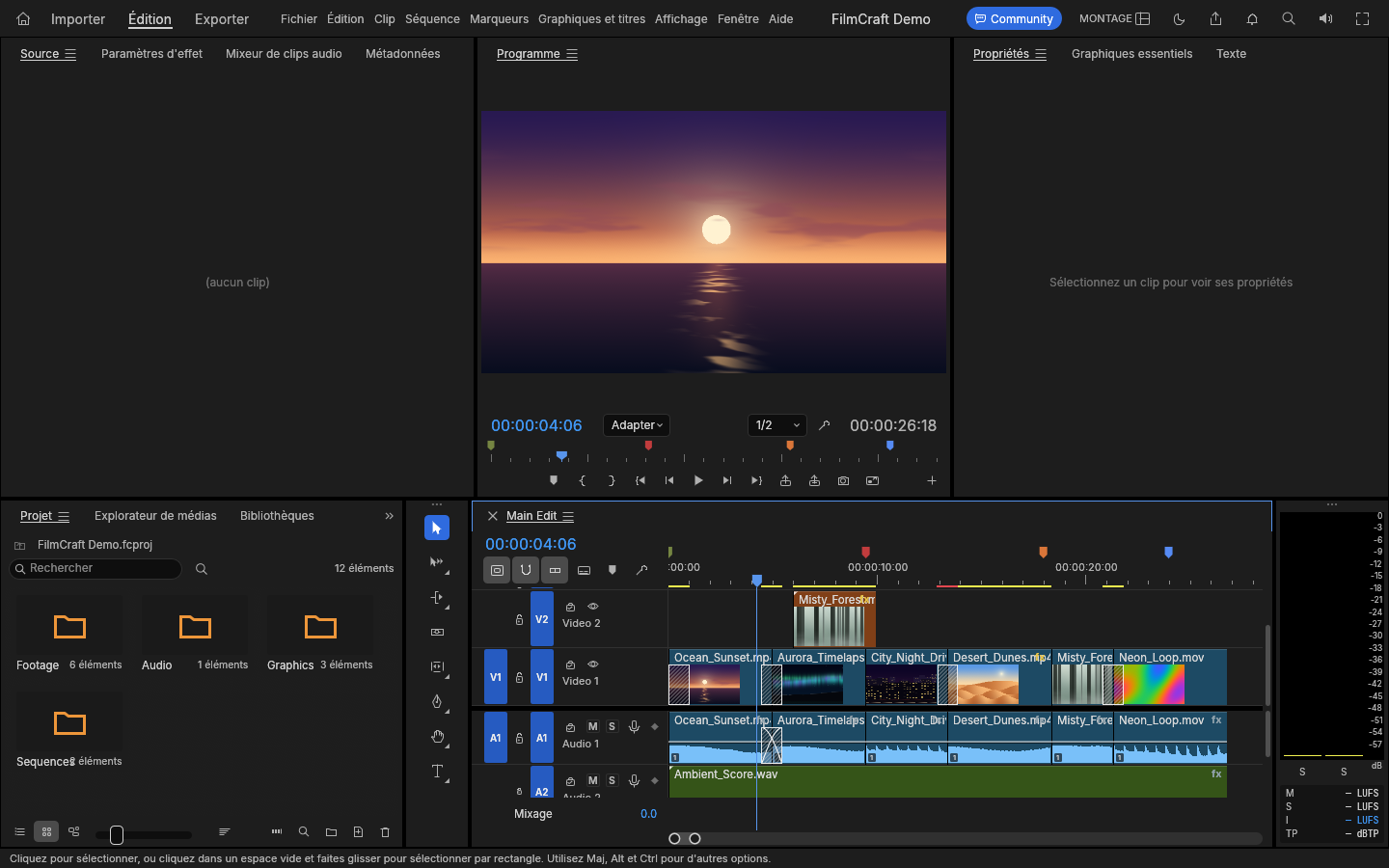
Editor workspace
The editor opens here, across the whole content width. Nothing is downloaded until you launch it.
Ready to launch
Loading the editor…
Editor running
The editor could not start
The editor bundle did not load. Check your connection, then try again.
The editor bundle for this version is not available on this server yet, so the app could not start.
The request never reached the server. You may be offline, or a network filter, firewall or browser extension blocked it.
The server answered with something other than the editor page, so the editor could not start.
The editor did not finish loading in time.
What you can try
- Check your connection and reload this page.
- Press “Try again” to request the editor a second time.
- Use a current version of Chrome, Edge, Firefox or Safari.
- Try a different launch option above, for example a fallback renderer.
This browser exposes neither WebGPU nor WebGL2, so the editor may not render. The compatibility option above selects the supported fallback where the engine offers one.
Fullscreen is not available in this browser, so the editor stays on this page.
Advanced options
Only options documented by the upstream application are listed.
Troubleshooting
- Check your connection and reload this page.
- Press “Try again” to request the editor a second time.
- Use a current version of Chrome, Edge, Firefox or Safari.
- Try a different launch option above, for example a fallback renderer.
Works in current desktop versions of Chrome, Edge, Firefox and Safari.
- FilmCraft is in alpha: upstream measures about 86 % of the feature set as present, but only about 56 % as ready for real production work. Premiere .prproj projects cannot be opened yet — bring edits in as FCP7 XML, AAF or OTIO.
- Media import was verified in-browser for PNG stills, PCM WAV audio and WebM/VP9 video on a timeline, and for H.264 MP4 export. ProRes, DNxHR, MXF, MPEG-TS, MJPEG and image sequences are documented upstream but were not tested in this version; real camera files and multi-gigabyte media are the least-tested path.
- Codec support depends on your browser: supported codecs are decoded by the browser’s own WebCodecs decoder, and everything else goes through the decoders built into the engine. Matroska and WebM files import slowly because opening them scans the cluster headers.
- Export means H.264 MP4 in practice: H.265 and AV1 export need a hardware encoder that browsers do not expose. Export is stepped (about 30 ms per interface frame), so a long timeline takes a while to finish.
- The browser build is single-threaded, so the commands that need worker threads on the desktop — render previews, proxies, Project Manager and mask tracking — report an error instead of running.
- Imported media stays readable only while the tab is open, unless the browser kept a copy in its own storage. FilmCraft writes a recovery journal every few seconds and copies imported media into browser storage (OPFS); clearing site data removes both, so export early and keep a backup of long edits.
- Two optional extras — speech-to-text and narration voices — download models from Hugging Face after a confirmation dialog that names the source, the size and the licence. The editor itself makes no third-party requests while it starts, and the footage you open is decoded locally by your browser.
Compatibility
Works in current desktop versions of Chrome, Edge, Firefox and Safari. The engine starts on WebGPU where the browser offers it and on WebGL2 where it does not; the launch options let you force the WebGL2 renderer with software compositing, or CPU compositing — the slowest but most compatible path. A browser that offers neither shows a message instead of the editor. This is a single-threaded build, so very large projects are slower than the desktop app.
This tool needs a current version of Chrome, Edge, Firefox or Safari with JavaScript enabled.
- FilmCraft is in alpha: upstream measures about 86 % of the feature set as present, but only about 56 % as ready for real production work. Premiere .prproj projects cannot be opened yet — bring edits in as FCP7 XML, AAF or OTIO.
- Media import was verified in-browser for PNG stills, PCM WAV audio and WebM/VP9 video on a timeline, and for H.264 MP4 export. ProRes, DNxHR, MXF, MPEG-TS, MJPEG and image sequences are documented upstream but were not tested in this version; real camera files and multi-gigabyte media are the least-tested path.
- Codec support depends on your browser: supported codecs are decoded by the browser’s own WebCodecs decoder, and everything else goes through the decoders built into the engine. Matroska and WebM files import slowly because opening them scans the cluster headers.
- Export means H.264 MP4 in practice: H.265 and AV1 export need a hardware encoder that browsers do not expose. Export is stepped (about 30 ms per interface frame), so a long timeline takes a while to finish.
- The browser build is single-threaded, so the commands that need worker threads on the desktop — render previews, proxies, Project Manager and mask tracking — report an error instead of running.
- Imported media stays readable only while the tab is open, unless the browser kept a copy in its own storage. FilmCraft writes a recovery journal every few seconds and copies imported media into browser storage (OPFS); clearing site data removes both, so export early and keep a backup of long edits.
- Two optional extras — speech-to-text and narration voices — download models from Hugging Face after a confirmation dialog that names the source, the size and the licence. The editor itself makes no third-party requests while it starts, and the footage you open is decoded locally by your browser.
Open the editor
Cut, trim, grade and mix on a real timeline. FilmCraft is a full desktop-class non-linear editor that runs inside your browser: nothing to install, no account to create.
Open-source attribution
This page embeds an upstream open-source application distributed under the MIT or Apache-2.0 licence. Licence files and notices ship with the bundle.
- Upstream engine: filmcraft v0.6.0
- Licence: MIT OR Apache-2.0 (LICENSE-MIT, LICENSE-APACHE, NOTICE, ATTRIBUTION.md, OFL-Inter.txt, OFL-JetBrainsMono.txt, FONT-LICENCE-Hack-MIT-and-Bitstream-Vera.txt, FONT-LICENCE-Ubuntu-Font-Licence-1.0.txt)
- NOTICE / ATTRIBUTION.md
- Source code: storytold/filmcraft
- Version: 0.6.0-faig.5 sha256 9fd024d371075dc8…
Independent project. Not affiliated with, endorsed by or sponsored by any software vendor.
Related tools
Privacy
The editor runs in your browser. FreeAIGeneration has no account system and stores no documents; see the privacy page for browser storage and third-party details.