What Are Keyframes in Animation?
A keyframe holds a value at a moment; interpolation draws the path between two. How the arithmetic works, why easing is a curve, and four beliefs worth correcting.
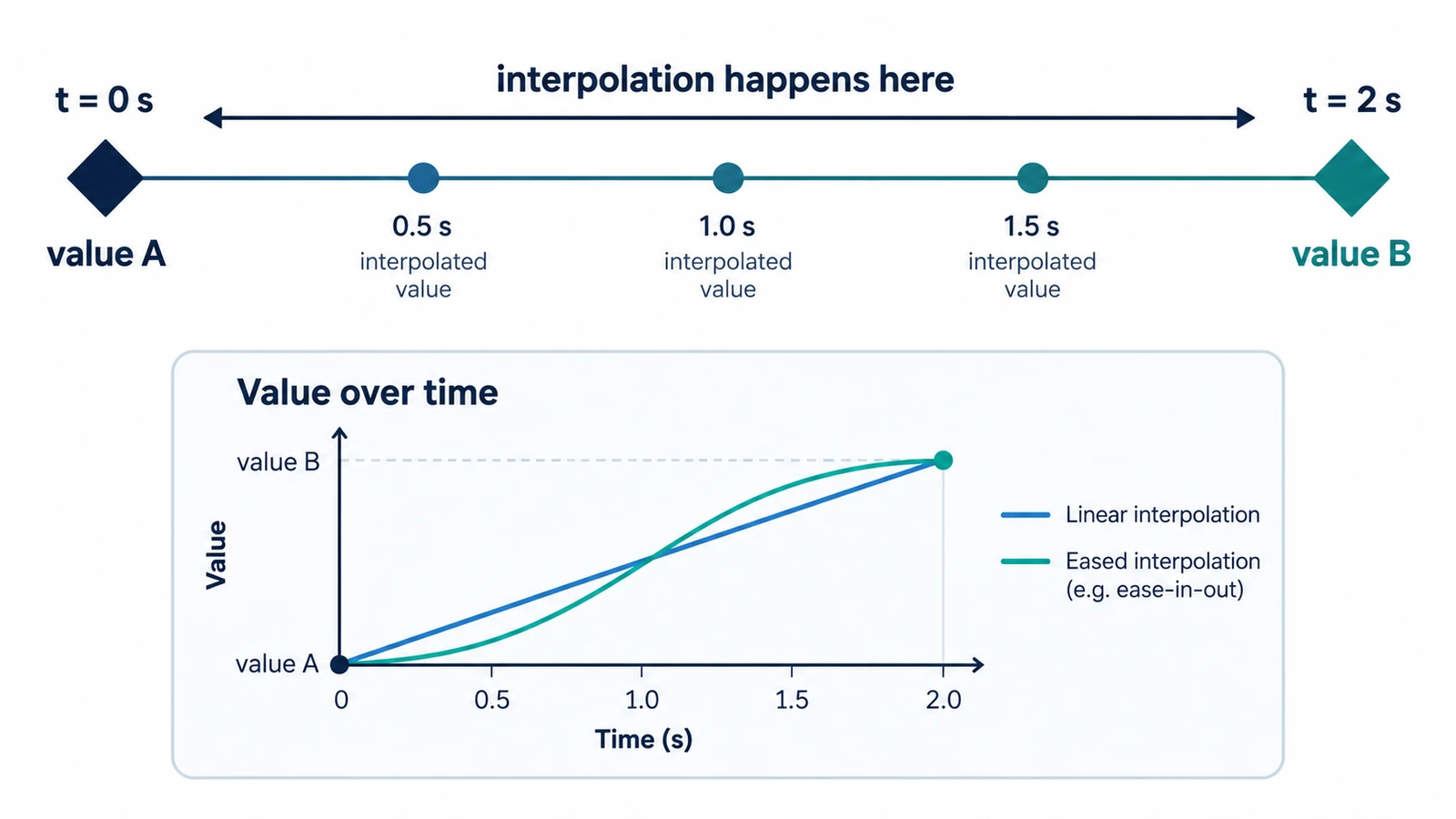
Animation looks continuous because no one is watching a thousand drawings. Software draws the frames you did not make, and it does that by calculating a path between the moments you did define. The moment you define is a keyframe, and the calculation between two of them is interpolation.
That one idea carries a surprising amount of practical weight. Once you can see keyframes as stored values rather than as drawings or markers, questions about timing, smoothness and frame rates stop being mysterious, and the arithmetic of keyframes in animation becomes something you can do on paper.
What a keyframe stores
A keyframe records one value of one property at one time. Position, scale, rotation, opacity, a mask path, the brightness of a colour: any of these can hold a keyframe, and each belongs to its own property rather than to the layer as a whole. That distinction matters because a single layer can carry dozens of independent animations, each with its own timing.
Two keyframes are the minimum for movement. With one keyframe a property simply holds that value; with two, the software has a start, an end and a duration to work with.
The arithmetic between two values
With linear interpolation the calculation is straightforward. Take a value of 0 at 0 s and 100 at 2 s. The formula is start + (end − start) × (elapsed ÷ duration). At 1 s that gives 0 + (100 − 0) × (1 ÷ 2) = 50. At 1.5 s it gives 0 + 100 × (1.5 ÷ 2) = 75.
The even steps are the point. Linear interpolation produces constant speed, so a 2-second move is travelling at full pace in the first frame and stops without warning in the last. Easing changes the shape of that line, not its endpoints.
Time in an animation editor is counted in frames, but most people think in seconds. The bridge is the frame rate. At 24 frames per second, a two-frame hold lasts 2 ÷ 24 = 0.083 s, which is short enough to feel like a deliberate tick rather than a pause. At 30 fps the same two frames are 0.067 s. The same edit reads differently at a different frame rate, which is why retiming a project is not only a matter of shifting keyframes.
Place keyframes with the frame rate in mind. A hold that looks right when you scrub at 60 fps may vanish when the composition is rendered at 24 fps, because the frames that carried it no longer exist. Decide the frame rate before you build the rhythm, not after.
Easing is a curve, not a style preset
Easing is a timing function applied to the interpolation, usually a cubic Bézier. The curve has two handles, one shaping the start of the transition and one shaping its end, and the slope of the curve at any moment tells you the speed of the property at that moment. A steep curve means fast movement; a flat section means a near stop.
The Lottie format makes this explicit in a way that is useful even if you never open a Lottie file: each keyframe carries an in handle, an out handle and a hold flag, h. When the hold flag is set, there is no curve at all and the value steps to the next keyframe. That is a real interpolation mode, not an unfinished ease.
Four beliefs worth correcting
More keyframes do not make motion smoother. Smoothness comes from the shape of the interpolation between a few well-chosen keys. Adding a key every few frames usually copies the curve you already had while making the move nearly impossible to retime.
Keyframes animate properties, not layers. Moving a layer on the timeline is a different edit from keyframing its position.
A keyframe is not always necessary. When a value should follow a mathematical rule — a rotation that keeps accelerating, a bounce that repeats — an expression can drive the property without a second keyframe, and the result stays adjustable through one number.
A keyframe is not a stop. The software keeps calculating between keys; a visible pause means the values are the same, not that time has frozen.
Seeing it in a real timeline
The Motion Graphics & VFX Editor runs in a browser tab and shows the concept in concrete form: a timeline with properties, keyframes and a graph editor where the interpolation becomes a curve you can drag. Projects save as .ecproj, and Lottie files import and export, which means the same keyframe model crosses into interface animation.
The authoring order — which property to key, when to open the graph editor, how to decide between a render and a Lottie export — is covered in the guide to creating motion graphics online with keyframes. If your curiosity is about the file rather than the timeline, what a Lottie file contains and how it works takes the same animation apart as JSON.
The test that settles most arguments
Find any animation you think looks good, and ask what each keyframe in it is doing. If you cannot answer for one of them, that key is probably noise. The animations that hold up under that question are rarely the ones with the most keys; they are the ones where every stored value had a reason to be stored.
Frequently asked questions
How many keyframes does a property need to move?
Two. The first holds the starting value and the second holds the end value, and the software interpolates the frames in between.
Does adding more keyframes make an animation smoother?
No. Smoothness comes from the interpolation curve between keys, and a dense set of keys makes the move harder to retime without changing the result.
What does a hold keyframe do?
It keeps a value fixed until the next keyframe, so the property steps instead of ramping. Lottie stores this state with a hold flag on the keyframe.
Try these FreeAIGeneration tools
Related articles
-
How to Create Motion Graphics Online with Keyframes
Set a property at two moments, then decide how the software travels between them. Timing before values, the graph editor, holds, and two exits: render or Lottie.
Creative workflows Motion graphics Browser tools No signup 4 min read
Published By Julia M. Gil
-
Motion Graphics vs Animation: What's the Difference?
The line is intent, not software: motion graphics explains, labels or brands, while animation performs. Where the boundary blurs and what each asks of a tool.
Creative workflows Motion graphics Browser tools No signup 5 min read
Published By Julia M. Gil
-
What Is a Lottie File and How Does It Work?
A Lottie file is readable JSON: a canvas, a frame rate and an array of layers. What the fields define, why text changes delivery, and what the format cannot carry.
Creative workflows Motion graphics Browser tools No signup Lottie 4 min read
Published By Julia M. Gil
Keep exploring
FreeAIGeneration is more than this article. The editors and calculators below are real, free and run in your browser.