What Is a Lottie File and How Does It Work?
A Lottie file is readable JSON: a canvas, a frame rate and an array of layers. What the fields define, why text changes delivery, and what the format cannot carry.
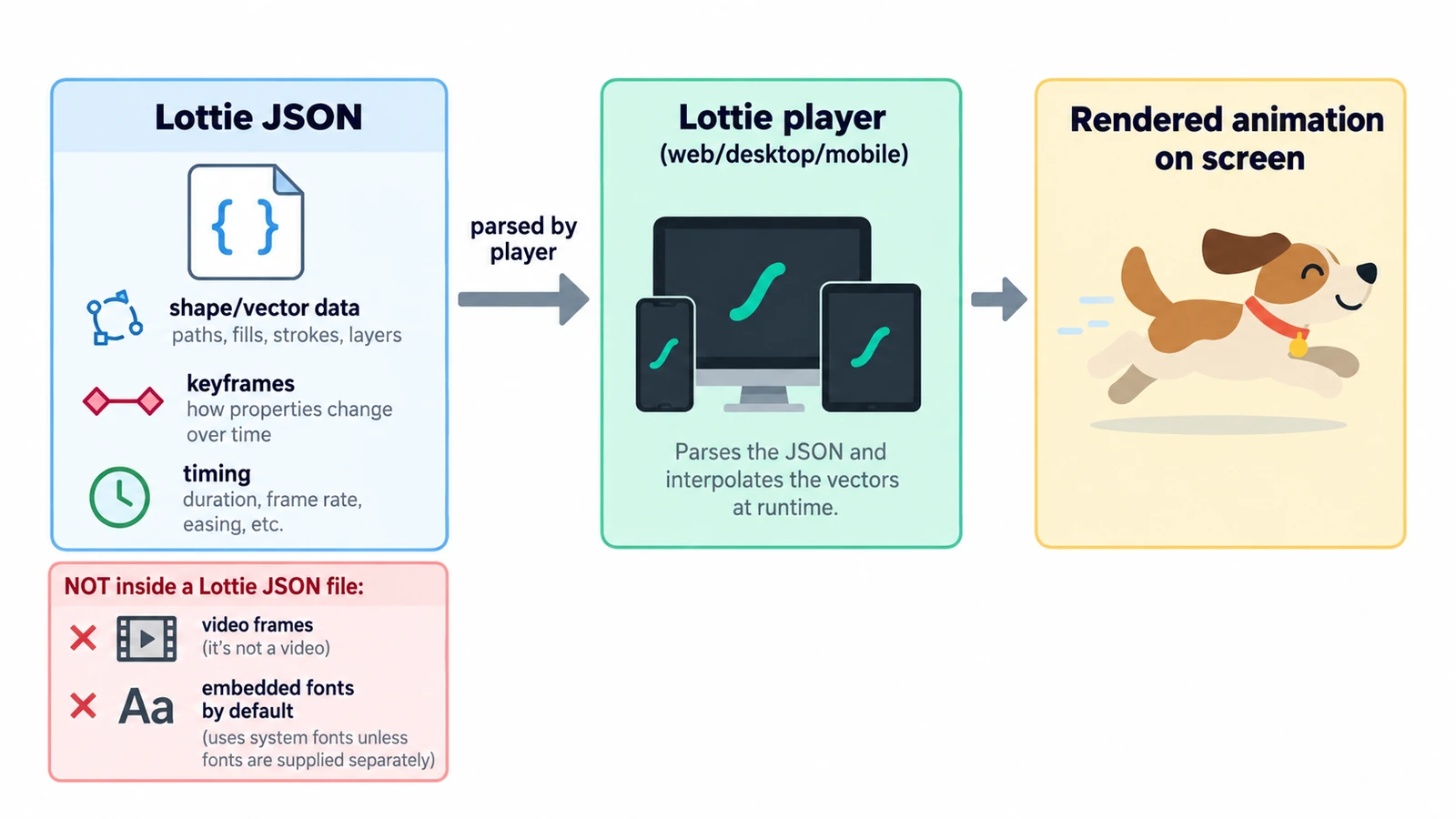
Open a Lottie file in a text editor and the first surprise is that it is readable. There is no binary header, no frame table, no compressed image data — just JSON with a version number, a canvas size, a frame rate and an array of layers. Everything the animation does is described in that text.
That structure also answers the usual question about what a Lottie file is and how it works. It explains most of the format’s behaviour: why a file is small for simple motion, why it scales without loss, and why it is easy to review in a version control diff. It also explains the limits, because what is not described in the JSON cannot be drawn by a player.
The fields that define the animation
A Lottie document declares a small set of top-level values: v for the format version, fr for frame rate, ip and op for the in point and out point, w and h for the canvas, and layers for the content. Those six values plus the layer array are the minimum a player needs to reconstruct the motion.
The arithmetic is simple. With a frame rate of 60 and an out point of 120, the animation is 120 ÷ 60 = 2 seconds long. At a frame rate of 30 with an out point of 90, it is 3 seconds. The duration is not stored anywhere as a number of seconds; it is derived from frames divided by frame rate, which is why changing fr retimes the whole animation.
Canvas size works differently from a video frame. A file with w set to 1920 and h set to 1080 holds no pixels at all; it declares 2,073,600 reference units, and the player maps them onto whatever size it draws at. That is the mechanical reason a Lottie looks sharp at 32 px and at 4K.
Why a text format changes the workflow
Because the animation is text, two versions of the same file can be compared line by line. A designer who moves a keyframe produces a visible change in the diff rather than a new binary blob, and a reviewer can see which layer and which property changed.
The format’s history matters here. Lottie was created by Airbnb and became widely used through Bodymovin, a motion-design extension that writes the JSON from a timeline.
Hand-editing a colour or a timing number is easy; restructuring a layer tree by hand is a fast route to an animation that renders nothing like the source.
Layers, shapes and keyframes inside the file
The layers array holds the content, and each layer points at shapes, transforms and keyframes. A keyframe in Lottie carries an in handle, an out handle and a hold flag, h. The handles describe the easing curve applied as the value travels to the next keyframe; the hold flag means there is no curve and the value steps.
This is the same interpolation model found in any timeline editor, expressed as data. It is also why the file stays compact: one path described once, animated by a handful of numbers, costs far less than a hundred frames of pixels.
What the format cannot carry
Lottie is an animation description for vector graphics and type. It does not carry audio, it does not carry video footage, and its 3D support is not a general three-dimensional renderer. Effects that depend on pixel processing — blurs that read neighbouring pixels, grain, complex compositing — either have to be approximated with supported effects or left behind.
Expressions are the other common casualty. A timeline editor can drive a property with an expression; not every expression survives the trip into another player, so a value that depends on one may arrive as a static number. The practical rule is to test the animation in the player that will run it, not only in the editor that made it.
Text depends on the player and the fonts it can reach, so appearance can shift between environments.
Delivery, not storage
The native project format in the editor that produces these files is not Lottie. The Motion Graphics & VFX Editor saves work as .ecproj, and uses Lottie as the interchange format in both directions — a Lottie can be opened, and a composition can be written back out as Lottie. The editable project and the deliverable are different files with different guarantees.
There is also a packaged variant. A dotLottie file, with the extension .lottie, wraps one or more animations in a compressed container; the data inside is the same JSON.
One expectation to drop early: a Lottie file needs a renderer that understands the format, and support varies by player and version. It is not a video that any media player will open. Choosing between Lottie, GIF and MP4 for a given delivery is a separate decision, covered in the three-format comparison. If you want the underlying time model first, what keyframes are in animation explains the values that become the JSON.
When a Lottie arrives from someone else, check three things before rebuilding anything: whether fr and op match the time slot you have, whether w and h suit the size you need, and how many raster-image layers the file carries, because a stack of embedded bitmaps is no longer the lightweight asset the format promises.
Frequently asked questions
Is a Lottie file a video?
No. It is a JSON description of shapes, layers and keyframes that a compatible player draws in real time, which is why it needs a renderer rather than a media player.
What is the difference between .lottie and .json?
A dotLottie file with the .lottie extension is a compressed container that can hold one or more animations, while the .json file is the animation data itself.
Does a Lottie file keep the audio from the original animation?
No. Lottie carries vector graphics and type, not audio or video, so sound has to be handled separately by whatever plays the animation.
Try these FreeAIGeneration tools
Related articles
-
How to Open CR2, CR3, NEF and ARW Files Online
CR2, CR3, NEF and ARW are four vendor containers, and having the file is only half the question. Test one frame for a real decode before importing a whole shoot.
Creative workflows RAW editing Browser tools No signup File formats 4 min read
Published By Julia M. Gil
-
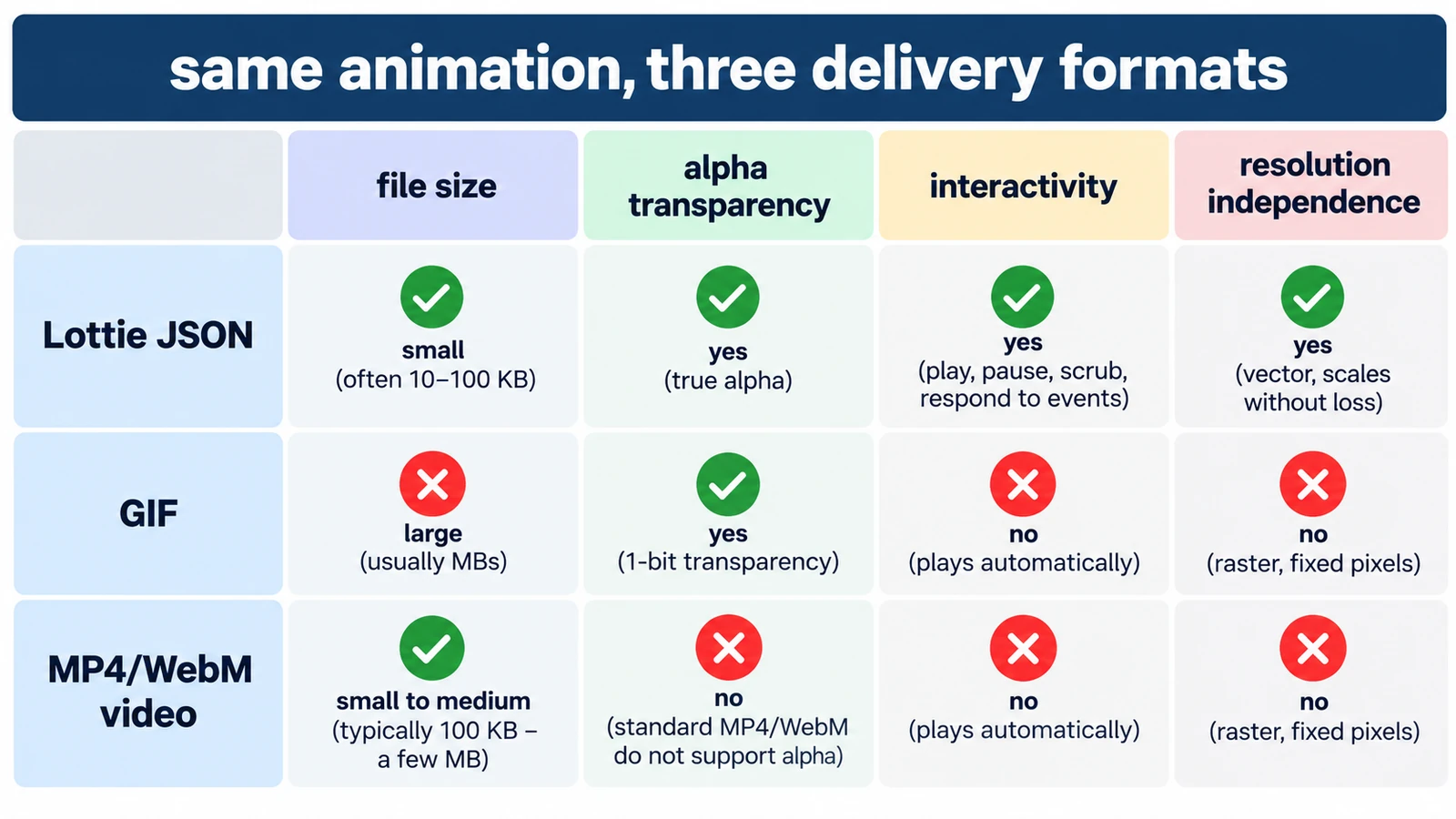
Lottie vs GIF vs MP4: Which Animation Format Should You Use?
GIF spends colour, Lottie spends structure, MP4 spends computing power. What each costs in transparency, size and editability, and which format earns its place where.
Creative workflows Motion graphics Lottie File formats Workflow comparison 5 min read
Published By Julia M. Gil
-
How to Create Motion Graphics Online with Keyframes
Set a property at two moments, then decide how the software travels between them. Timing before values, the graph editor, holds, and two exits: render or Lottie.
Creative workflows Motion graphics Browser tools No signup 4 min read
Published By Julia M. Gil
Keep exploring
FreeAIGeneration is more than this article. The editors and calculators below are real, free and run in your browser.