How to Resize an SVG Without Losing Quality
Resizing a vector usually changes nothing in the drawing, because display size is set outside it. Where quality can still disappear, and a short check before you ship.
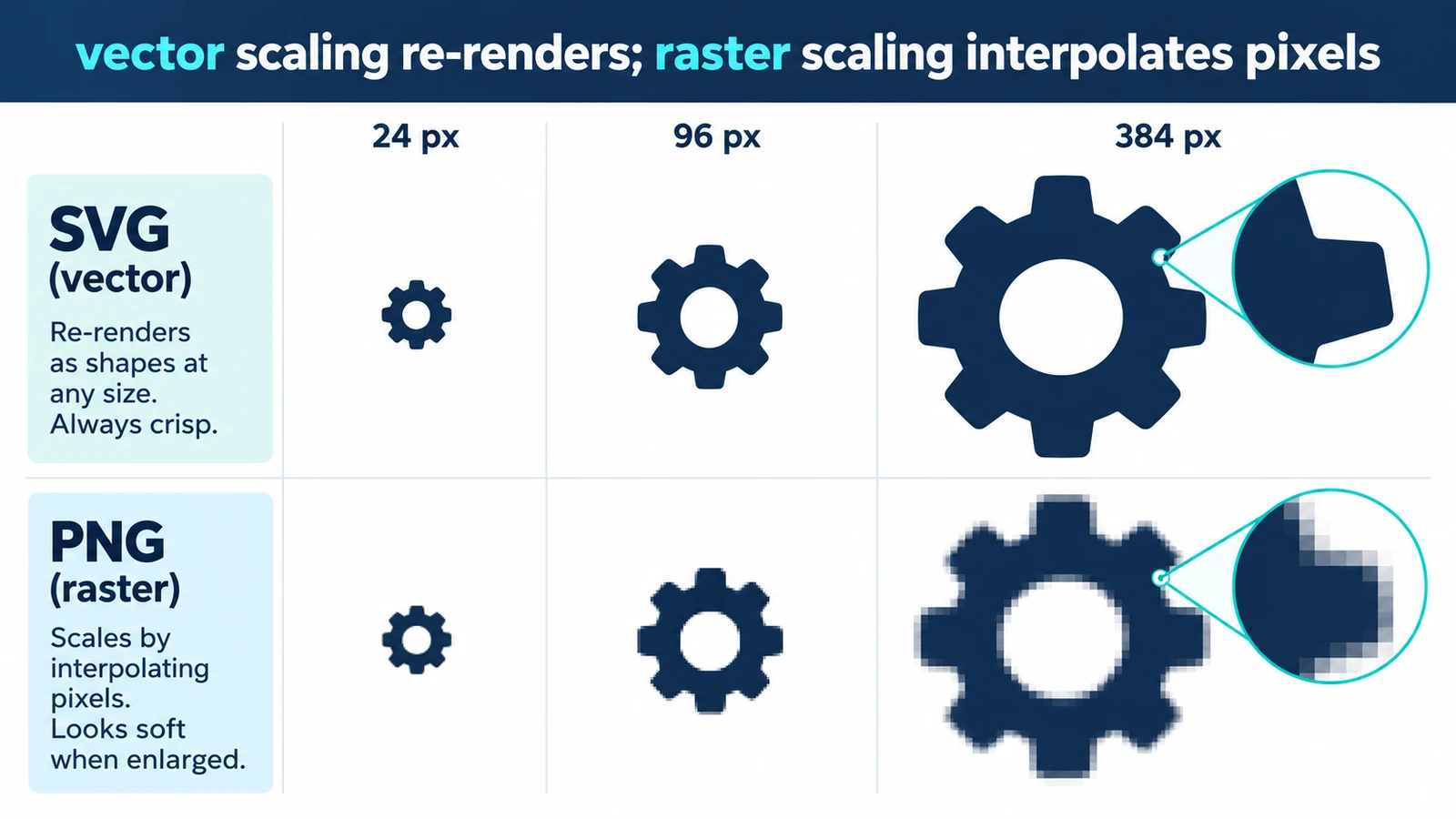
What does resizing a vector file actually change? Usually nothing in the drawing. Resize an SVG and the same numbers are rendered at a larger size, which is why a 24 × 24 icon can fill a poster without one pixel being guessed. Resizing an SVG without losing quality is therefore less about a scale command and more about knowing which of three different operations you actually want: a bigger display, a bigger drawing, or a bigger export.
Those three are worth separating before anything else, because mixing them up produces the blurry-edged, badly spaced, oversized results.
Display size is set outside the drawing
An SVG describes shapes in user units and hands the renderer a viewBox that maps those units onto the display area. With viewBox="0 0 24 24" and width 240, each user unit becomes ten device pixels. Nothing inside the document changes.
Push the display size to 2,400 px and the scale is 100×. A 1-unit stroke now renders 100 px wide, because stroke widths are stored in user units like everything else. That is not a conversion error; it is what the file said.
The mechanism is what makes an icon system work: one file, drawn once, appearing in a toolbar at 16 px and on a poster at 1,600 px.
Scaling the artwork is a different operation
Enlarge the canvas without enlarging the objects and you get a bigger page with the same drawing on it — padding, in other words, not a larger illustration. Scale the objects and the geometry and the strokes grow together.
Sometimes that is exactly wrong. A hairline that reads well at 100 px becomes a 10 px bar at 1,000 px, which is a design change rather than a size change, so strokes meant to stay thin need their width set again after scaling.
Type splits the same way. A text object scaled up grows with the drawing; the same characters re-set at a larger point size keep their letterforms and re-flow their line breaks.
Where quality can still disappear
Two things in a vector file are not resolution-independent, and both are easy to miss.
An embedded raster is one. A photograph or screenshot placed inside the SVG keeps its own pixel grid, so a larger display does not add detail: the vector parts stay sharp around a soft image. If a file goes blurry when enlarged, look for an embedded image before blaming the renderer.
Missing fonts are the other. Text set in a font the renderer does not have is substituted, and the substitution changes line widths, so a headline that fit its box at the old size can overflow at the new one.
Working out a target size
For screen output, the number that matters is the CSS pixel size multiplied by the device pixel ratio: a 1,200 px banner on a 2× display wants 2,400 px of rendered output.
For print, resolution is ppi against a physical size, so A4 at 300 ppi is 2,480 × 3,508 px. When the final step is a raster export, export at those pixels rather than scaling the CSS size and hoping.
For a logo used at many sizes, the answer is not a size at all: keep the SVG and let each placement ask for what it needs.
A short check before you ship
Open the file in the Vector Editor, read the viewBox and confirm it matches the drawing you think you have. Test the smallest and the largest real display sizes, not a convenient middle one. Search the document for an embedded image. Confirm the fonts are either available at the destination or converted to outlines.
Then export. The editor writes SVG for further editing, or a raster format at a fixed pixel size, and both arrive as browser downloads.
If the file is getting heavy rather than getting small, optimizing an SVG for the web is the next step; if it is not open yet, the browser editing workflow starts there.
Frequently asked questions
Does enlarging an SVG increase the file size?
No. The numbers in the document stay the same and only the rendered pixel count grows, so display size and file weight are independent.
Why do my strokes get thicker when I scale the artwork?
Stroke width is stored in user units, so it scales with the geometry: a 2-unit stroke rendered at 10× displays 20 px wide.
Can a larger display size rescue a blurry embedded photo?
No. An embedded raster keeps its own pixel grid, so enlarging its display interpolates existing pixels instead of adding detail.
Try these FreeAIGeneration tools
Related articles
-
How to Change SVG Colors, Text and Paths Online
Recolouring an SVG can leave a ring of the old colour behind: fill and stroke are different properties. Covers paint values, type, path geometry and export checks.
Creative workflows Vector editing Browser tools No signup SVG editing 4 min read
Published By Julia M. Gil
-
How to Edit SVG Files Online in Your Browser
An SVG is geometry written as text. What opening one in the browser exposes, the order to work in, where the browser boundary sits, and the mistakes that cost time.
Creative workflows Vector editing Browser tools No signup SVG editing 4 min read
Published By Julia M. Gil
-
How to Prepare and Optimize SVG Files for the Web
Six kilobytes of nothing is usually excess precision. Separating what the file says from what the network carries, plus embedded rasters, serving and a visual check.
Creative workflows Vector editing SVG editing Image optimization Import & export 3 min read
Published By Julia M. Gil
Keep exploring
FreeAIGeneration is more than this article. The editors and calculators below are real, free and run in your browser.