Adjustment Layers vs Direct Edits: Which Should You Use?
Both methods can produce identical pixels; the difference is what the file can still change later. What each costs, and how to choose when the brief is hazy.
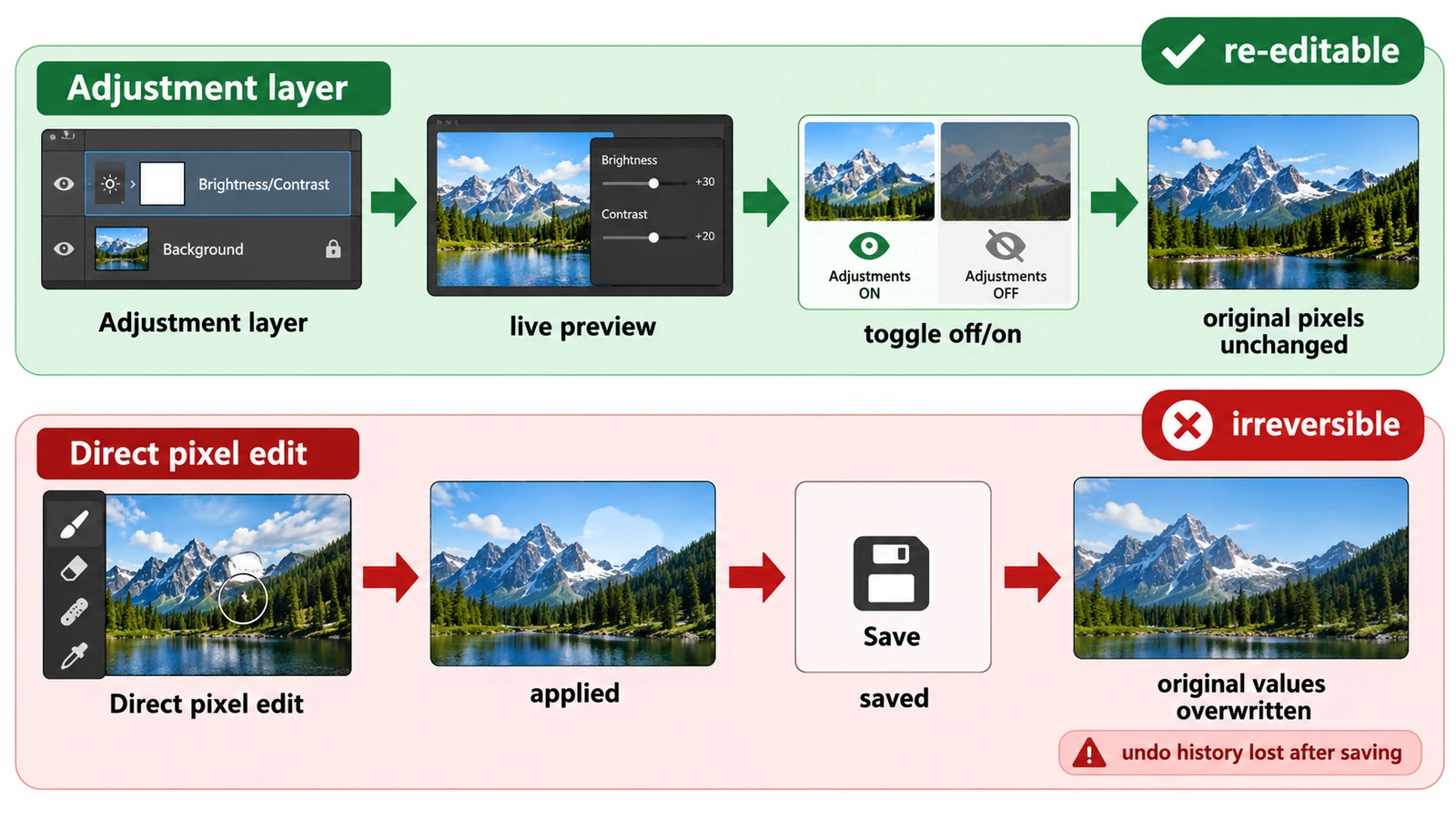
Adjustment layers vs direct edits is not really a question about which one produces a better picture. On screen the two can be identical down to the last value. The question is what the file can still answer next week, and how much of the work you are willing to redo when the answer changes.
An adjustment layer stores settings that are re-applied every time the image is rendered. A direct edit stores the result and discards the settings.
One worked example makes it concrete
Take a mid-gray pixel holding the value 128 and brighten it by a factor of 1.2.
With an adjustment layer, the stored pixel stays at 128. The parameter lives on its own layer, and at render time the value becomes 154. Look at the pixel data and you find 128; look at the screen and you see 154.
With a direct edit, the pixel becomes 154 and nothing of the 128 remains except whatever copy you kept elsewhere.
Everything else follows. Trimming the adjustment from 1.2 to 1.1 is a parameter change on one layer. Undoing a direct edit means reconstructing the area from an earlier copy, or starting again.
What each approach costs
A direct edit is fast, has no stack to manage, and produces the file that is easiest to hand to another application. Its cost is paid later, in reversibility, and it is paid all at once because the original values are gone.
An adjustment layer costs a little organization: a named layer, sometimes a mask, and a stack whose order matters. In return, the change can be removed on its own, confined to part of the image, and re-tuned after the fact.
There is a third case worth naming. Retouching — work that repairs the pixels rather than describing a relationship between values — is destructive by nature. That work belongs on its own layer and is revised by redoing it, not by adjusting a number.
Where both approaches end up in the same place
Export. Both produce flattened pixels in a PNG or JPEG, and nothing in the exported file says which route was taken. An adjustment layer is a document structure rather than image data, so it exists only for as long as the layered file exists.
Two practical consequences follow. A client who receives a JPEG has received a direct edit in effect, whatever happened upstream. And a layered master that was never saved is no more reversible than a direct edit, because the structure has to survive in a file to be useful.
Choosing when the brief is uncertain
If the output is fixed, final, and going out today, a direct edit is not a mistake. Plenty of production work is one pass, one size, one destination.
If the image may be re-graded, reused at another size, or approved by somebody who will ask for it lighter, an adjustment layer costs almost nothing and saves the redo. The same applies when only part of the image should change: an adjustment limited by a mask is easier to revisit than a repair painted into the pixels.
The default worth adopting is to adjust first and flatten last, rather than flatten and hope.
Reading the limits carefully
An adjustment layer affects the layers beneath it in the stack, not the ones above, so its position is part of the decision. A mask on the adjustment layer limits where the change applies, which is how a local correction is usually built.
Which adjustment controls exist varies between editors and is worth confirming in the one you have open. What does not vary: no adjustment survives a flattened export, and no layered document is safer than its saved copy.
The Photo Editor provides adjustment layers and masks as part of its layer stack. The workflow that builds one is laid out in editing photos with layers and masks, and the way two layers combine once both are present is a matter of blend modes.
Frequently asked questions
Do the two approaches look different in an export?
No. A PNG or JPEG contains the composited result either way, so the difference exists only while the layered document still exists.
Can I remove a single adjustment later?
In a layered document, yes: the change is stored as settings on its own layer, so deleting that layer removes that change and leaves the rest of the stack intact.
Which layers does an adjustment layer change?
The layers below it in the stack; a mask on the adjustment layer restricts the change to part of the image.
Try these FreeAIGeneration tools
Related articles
-
How to Edit Photos Online with Layers and Masks
The layered master you can still revise and the flat copy you send are two different files. Build the stack in a durable order, and know the browser's honest limits.
Creative workflows Photo editing Layers Masks Non-destructive editing 3 min read
Published By Julia M. Gil
-
RAW vs JPEG: Which Format Should You Edit?
One exposure, two records: sensor readings and a finished rendering. The gain is bit depth rather than resolution, and the trade-offs decide what stays fixable later.
Creative workflows RAW editing File formats Non-destructive editing Workflow comparison 4 min read
Published By Julia M. Gil
-
How Layer Masks Work: A Beginner's Guide
A mask is a coverage map beside the pixels: white reveals, black hides, grey blends. What the values mean, why the direction feels backwards, and what a mask cannot do.
Creative workflows Photo editing Browser tools No signup Layers 4 min read
Published By Julia M. Gil
Keep exploring
FreeAIGeneration is more than this article. The editors and calculators below are real, free and run in your browser.